Tuesday, August 16, 2011

New AstroMiner Screenshots

I added a whole bunch of stuff to AstroMiner.  One of the comments I got from the web version is that momentum would be more fun, so I added that.  I added a background image to fill in the black, the ability for me to single out the top blocks (for when I want to add things on top of them), a very basic UI that shows health, fuel and a momentum meter.  The momentum meter will allow the player to see how fast they're traveling in a certain direction.  If they are going too fast when they land or hit a wall, they will lose health.

Eating a block will now add fuel to your ship.  It's not enough fuel to really keep playing.  Just enough to somewhat move around.  This will make it so the player still has to build fuel depots.  The ship will also harvest fuel from the air incase the player totally runs out, but it's a very small amount and only really meant for emergencies.


Notice the meter on the top left.

I'm falling, so the meter is indicating my downward momentum.

Running low on fuel so I'm eating some blocks.
Sweet, succulent fuel is being consumed.

Anyway, I have some people doing play testing to solve a video card issue I had with the first test.  All looks good so far though.  I'll create a YouTube video soon and hopefully put a playable version up soon.

Sunday, August 14, 2011

From concept to prototype to real..

A couple of days ago I posted about a prototype I had made in HTML5.  It can still be found at http://www.dangerz.net/explorer/.

Astro prototype in JavaScript/HTML5
I really liked the concept and wanted to go forward, so I got to coding.  When I first started coding I was using libSDL/C++.  I wanted to learn libSDL and I thought this would be a good project for that.  After doing that for a little bit, I thought about how I had paid for the XNA license and haven't published anything yet.  I decided that I wanted to keep this project in XNA so I could publish it on the Xbox Live Arcade dealie.  So I got to coding..

The following are some screenshots of what I have so far.

First XNA Version


So the first thing I did was a 1:1 representation.  I made a little spaceship graphic and built the procedurally generated asteroids.  You couldn't add or delete blocks at this point.  It was simply flying around.  I added little animations for the thrust and played for a little bit.  After some time, I thought that the blocks were too small and it could become a hassle trying to build tunnels.  I decided to make the blocks a little bit bigger.


Those blocks looked way too big.  I lowered their size and found something I could live with.


Once I got that, I started adding more gameplay elements.  I added the capability to drill blocks.  I added the capability to hover in place.  I added animations for all of that and I'm doing it in a way that's 100% XBox safe from the beginning.  The following screenshots are what I have so far.

You can see different types of blocks here, all procedurally generated.

You can see me drilling here.  Notice the little texture of the broken block.  Little sparks shoot out from my drill too.

Just drilling down.  The player can drill in all 4 directions.

Here I am flying up.

This is my spaceship just sitting there.
So far I'm having fun just building the thing.  I'm really happy with the world/block type algorithms and it all runs really fast since it's just 2d.  I'm going to continue plugging away and add some AI to the game to make it a bit more challenging.  The player is going to have to build fuel depots and things like that so they can keep flying around.  I have a lot of ideas for this, so I'm going to focus on it for a while and let R-01 sit for now.  I still go back and change/add stuff here and there but the main purpose of it all was to become better at 3d game programming and I think I've accomplished that and more.  The whole reason I was able to get this new game (currently called AstroMiner) up and running is because of all that I learned with R-01.

So anyway, I'll make a gameplay video when I have more things in place.

Until then..

Wednesday, August 10, 2011

A Little Explorer Prototype

I like Javascript because it's easy to prototype game ideas.  Case in point:  http://www.dangerz.net/explorer/

Use the arrow keys or WASD to move around.   IJKL will eat corresponding blocks and H will hover.  It works best in Chrome but should still work in the other browsers.  Open the source code to find some comments and stuff you can change around.

So I had this idea for a 2d asteroid mining game (kinda like the one I posted a few months ago).  I started writing it in C++/libSDL but I wanted a quicker way to prototype, so JS it is.  I also wanted to learn HTML5 so I used this prototyping opportunity to do that too.  This demo uses Canvas and LocalStorage.

I will say that the code isn't the prettiest since it's just a prototype, so I apologize for that.  I'm thinking that for bad guys, I'll have meteors that can come crashing down and can break that outer layer of the main asteroids but not the inner dark layer.  That will force you to build bases inside that.  I'll also have some other kind of flying enemy that will require you to maneuver around, but I'm going to wait for the actual game to put all that in.  This was just to make a proof of concept.

Anyway, that's all I've been toying with.  I've had friends visiting for the last month and my grandfather is currently spending a few days here, so I haven't had much dev time.  I can't really complain because I enjoy the company :]

Tuesday, July 19, 2011

Some screenshots and fun with libSDL.

I was toying around with some gameplay elements and decided to raise the water level.

It's pretty fun to play around with and I think I might keep it at that level.  It lets me still have some high mountains and also includes deeper oceans.

I also started looking at libSDL.  I have an neat game idea that still involves procedurally generated terrain, but I want to try it in a format I haven't done yet and I think libSDL/C++ is a good choice.  This doesn't mean I'm stopping my XNA dev.  This just means that I now have a second project to report on.

In my search for SDL Tutorials, I found http://www.sdltutorials.com/.  I've been following those and so far haven't had many issues.  Hopefully I'll have some new screenshots within the next week.

Wednesday, July 06, 2011

Underwater Screenshots

Still needs lots of tweaking but it's a start :]


The deeper you go, the less you can see away from you.  I need to simulate some particles in the water or something but I think that's something I have to do with the shader.

Ocean Water!


Thanks to the guys at the SA forums, I was able to figure out my issue.  Here's what they told me:

You probably have depth write enabled. If that's the case, it'll appear translucent if it's drawn after the geometry below it, but opaque if it's drawn before because it'll block anything behind it from being drawn.

and

... for which the solution is to draw all your transparent things last, and, if there's more than one transparent thing that might overlap, draw them in order from far to near.
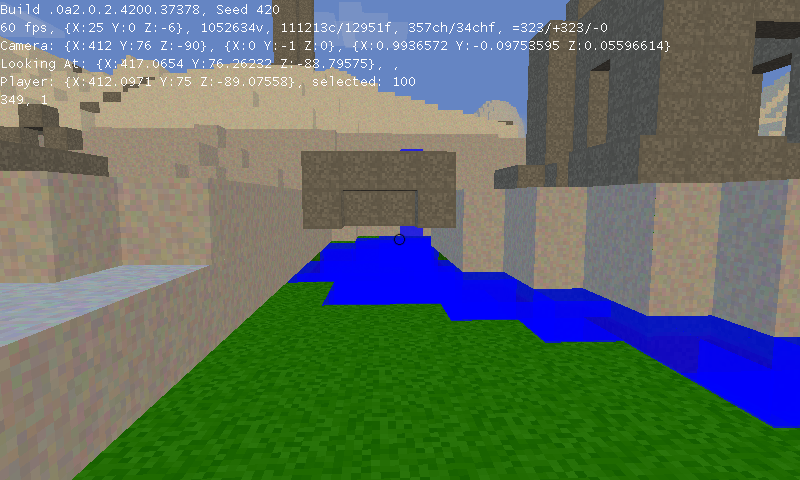
After putting that fix in it all looks good now :]

Ocean Water?


Looks like crap but it's a start.  I'm having an issue with transparent textures on the ocean water cubes.  It's causing the cubes below it to render really weird.  Don't have time to research it tonight though so I'll check it out tomorrow.

Tuesday, July 05, 2011

Monday, July 04, 2011

More Water Screenshots


Updated the way water works.  I think I'm happy with it now.  So far my logic is like so:

if the water level > 0
 if there's a cube below
  if there's no cube behind
   add water behind
  if there's no cube in front
   add water in frnot
  if there's no cube to the left
   add water to the left
  if there's no cube to the right
   add water to the right
 else
  add water below

If we're adding water below us, we add the water with the same amount of level as before.  If we're adding water anywhere else, we lower its level by 5 so it's not infinite.  The only time it can be infinite is if it were to keep going down nonstop.  Since we have a hard lower limit (higher is infinite still), we're guaranteed to always have some kind of hard stop.

I still haven't found a solution for the ocean that doesn't destroy the CPU.  It's pretty fun to toy with this water though so I'm in no hurry.

Saturday, July 02, 2011

Water Screenshots!


Obviously it needs texturing and stuff.  I just thought I'd post some preliminary screenshots.

edit: Oh god infinite water.


Thursday, June 30, 2011

New Texture Stuff, Screenshots and some compartmentalization.

A couple of months ago I posted a question to reddit.  I asked them if they ever think about starting over and rewriting their games from scratch using all their newfound knowledge.  Every 2 months I have this urge.  I feel like I could rewrite the game without all the previous mistakes and make it even more OOP.

Reddit's response was a pretty clear no.  They said that if you do this once, you'll keep doing it over and over  and instead of adding features I'll be spending my time rewriting code.  Their solution was to fix things as I went along and when I wanted something different to code, rewrite the sections that needed work.

So that's what I did this week.  Input from the player was being checked from many different places.  This was really hard to maintain so I've compartmentalized that into a single controller class.  It takes the input and makes changes to the world.

I've rewritten part of the chunk generation code to allow me to have multiple texture passes.  I was concerned this would take the game longer to launch but after timing before/after, I didn't notice any difference in the load  times.  Multiple texture passes allows me to do this:


So I'm going to continue working on that stuff this week. It's fun to be back in programming mode.

Wednesday, June 22, 2011

What I've been up to.

I've been doing a lot of non-pretty enhancements to the game.  I have a basic client/server architecture set up, but it doesn't even really have authentication.  The player just constantly sends their position to the server and it tracks it.  I'm using UDP for that.

I've also updated the pool class so it uses my hose class.  This seemed to make the game load faster, but that might just be in my head.

I'm working on the texture algorithm, but I'm not entirely sure where to start with it.  I don't want to call the Perlin noise algorithm since that'd put a 2nd call in the code and cause some significant slowdown.  I'm thinking some kind of combination of the height of the block + the terrain base height + how far it is from the "surface".  That's my guess so far, but I have nothing definite.

The other thing I'm still mulling around is how I want to do water.  Again, I have an idea but I'm not entirely certain of how to approach it.  My idea works for placing a block of water and having it run down a hill or fill a hole, but I still don't know how I'm going to scale it up to a full ocean without having some crazy overhead.

Anyway, that's what I'm working on.  No new screenshots since I haven't really made anything visually new.

Wednesday, June 08, 2011

Object Pool has been redesigned.

I spent the evening learning about Generics in C#.  Using my newfound knowledge, I was able to revamp my object pool.  I knew that what I was doing initially wasn't the best approach, but it worked and it was fast.  My new version works, is just as fast and is a lot more elegant.

In the old version, I had a pool for chunks, cubes and creatures.  Each individual pool had something like this:

1:      public static Queue<chunk> chunkPool;  
2:      public static int chunkCount;  
3:      public static int numFreeChunks;  

It also had multiple methods for getting an object and putting it back.  Everytime I wanted a new pool, I had to create a new set of objects and methods.  It worked, but was ugly.  The new pool is this:

1:    public static class pool  
2:    {  
3:      public static hose<tree> treePool;  
4:      public static hose<change> changesPool;  
5:      public static hose<cube> cubePool;  
6:      public static void init()  
7:      {  
8:        treePool = new hose<tree>();  
9:        cubePool = new hose<cube>();  
10:        changesPool = new hose<change>();  
11:      }  
12:    }  

Hose<T> is a generic class that has everything embedded in it.  Creating new pools is now much cleaner and easier.

I've been testing this in the 2d version (from here on out, called 2dr) instead of the 3d (called 3dr).  Once I make sure it's cool, I'll migrate it over.

Edit:  Forgot to put this originally.  My hose class:  http://pastebin.com/mNU5qgHw


using System;
using System.Collections.Generic;

namespace R_01.classes
{
    public class hose<T>
        where T : class, new()
    {
        private Queue<T> objectPool;
        public int count;
        public int numFree;
        private bool lockObjects;

        public hose()
        {
            objectPool = new Queue<T>();
            lockObjects = false;
            numFree = 0;
            count = 0;
        }
        public T get()
        {
            while (lockObjects && !gameData.exiting) { }
            lockObjects = true;

            T obj;

            lock (objectPool)
            {
                try
                {
                    if (numFree > 0)
                    {
                        obj = objectPool.Dequeue();
                        numFree--;
                        if (obj == null)
                        {
                            obj = new T();
                            count++;
                        }
                    }
                    else
                    {
                        obj = new T();
                        count++;
                    }
                }
                catch (Exception ex)
                {
                    ex.ToString();
                    obj = new T();
                    count++;
                }
                finally
                {
                    lockObjects = false;
                }
            }

            return obj;
        }
        public void put(T obj)
        {
            while (lockObjects && !gameData.exiting) { }
            lockObjects = true;

            lock (objectPool)
            {
                try
                {
                    objectPool.Enqueue(obj);
                    numFree++;
                }
                catch (Exception ex)
                {
                    ex.ToString();
                }
                finally
                {
                    lockObjects = false;
                }
            }
        }
    }
}

3D Meets 2D

Wanted a change of pace and an easier way to focus on AI without worrying about 3d, so I wrote up a 2d version of my game.  The nice thing about OOP is that I was able to reuse a majority of my code.


Same procedurally generated terrain that's infinite in all directions.  It's fun to explore (although not as fun as the 3d version), but I am working on adding digging up/down.  I actually have that part done already.  I just don't know how properly display multiple levels of terrain.

So anyway, nothing special about this - just a test-bed for my AI ideas and some other things I want to try.

I'll continue my AI work in here.  Once I get something implemented, I'll push it into the 3d version and post it up.

Thursday, May 19, 2011

Updates, Screenshots and a Short Hiatus

I have some family visiting for the next 2 weeks, so I'm not going to be able to work on the game as much.  Since I last posted, I've added gravity that becomes weaker as you get higher (to the point where there's no gravity aka leaving the planet), momentum and friction (different types of surfaces have different amounts of friction aka slide on ice, walk normally on dirt/grass), chunks now save the map data (game loading time in a highly mountainous area has gone from 34 seconds to 14 and chunks that have already saved themselves now load in ~10-15ms instead of 60-240 depending on height aka much faster loading) and a very basic AI (stupid little object that just follows you around).  So I've made some progress but it'll be frozen for the next couple of weeks.  My brothers will be here, though, so they'll give me some good ideas for things to add.

I'll talk to ya'll in a couple of weeks.


~

Saturday, May 14, 2011

New Version Released + Website

I've pushed out a new version (.0a1.0.1.4151.31367) to the testers.  The game should load faster now and take up less memory.  My Dictionary<Vector3,bool> that stored all visible cubes is now a Hashset<Int16>.  Almost as fast but a lot less memory, so it's worth it.  I also just realized that I forgot to update the version number to .0a2.

Feature-wise, you can now switch the type of block that they're adding by using the number keys.  ~ key is a hard stone, 1 and 2 are stone and dirt, 3 and 4 are water and 0 is whatever the texture algorithm picks.  I've re-enabled fog and added clouds and I've added a primitive day/night cycle.  I've created a 1x500px image file that has all the colors starting with nighttime->sunrise/set->daytime.  I load that in, pull all of those colors into a Color[500] array and dispose of it.  The day is 500 ticks long (each tick lasting a second) and I change the color of the sky by setting it to whatever that position in the gradiant is.  The file is located in the %appdata%/.r01 folder and is called skyColor.png.

Lastly, I've switched r-01.com to a new server and am working on setting it all up.  Until then, the forums are down.  Hopefully I can put something pretty together by the end of the week.

Wednesday, May 11, 2011

Clouds

Nothing amazing, but it's a start :]


I also have them slowly moving along the X axis.  I'm going to make it so different altitudes have different wind speeds.