Saturday, July 02, 2011

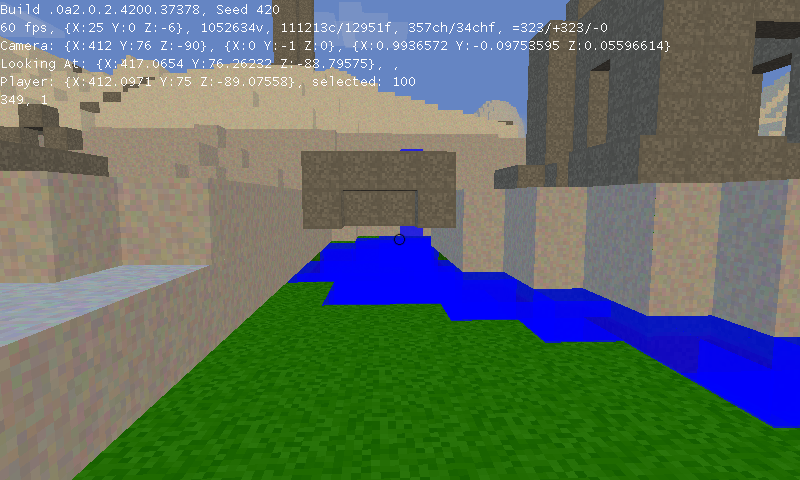
Water Screenshots!


Obviously it needs texturing and stuff.  I just thought I'd post some preliminary screenshots.

edit: Oh god infinite water.


Thursday, June 30, 2011

New Texture Stuff, Screenshots and some compartmentalization.

A couple of months ago I posted a question to reddit.  I asked them if they ever think about starting over and rewriting their games from scratch using all their newfound knowledge.  Every 2 months I have this urge.  I feel like I could rewrite the game without all the previous mistakes and make it even more OOP.

Reddit's response was a pretty clear no.  They said that if you do this once, you'll keep doing it over and over  and instead of adding features I'll be spending my time rewriting code.  Their solution was to fix things as I went along and when I wanted something different to code, rewrite the sections that needed work.

So that's what I did this week.  Input from the player was being checked from many different places.  This was really hard to maintain so I've compartmentalized that into a single controller class.  It takes the input and makes changes to the world.

I've rewritten part of the chunk generation code to allow me to have multiple texture passes.  I was concerned this would take the game longer to launch but after timing before/after, I didn't notice any difference in the load  times.  Multiple texture passes allows me to do this:


So I'm going to continue working on that stuff this week. It's fun to be back in programming mode.

Wednesday, June 22, 2011

What I've been up to.

I've been doing a lot of non-pretty enhancements to the game.  I have a basic client/server architecture set up, but it doesn't even really have authentication.  The player just constantly sends their position to the server and it tracks it.  I'm using UDP for that.

I've also updated the pool class so it uses my hose class.  This seemed to make the game load faster, but that might just be in my head.

I'm working on the texture algorithm, but I'm not entirely sure where to start with it.  I don't want to call the Perlin noise algorithm since that'd put a 2nd call in the code and cause some significant slowdown.  I'm thinking some kind of combination of the height of the block + the terrain base height + how far it is from the "surface".  That's my guess so far, but I have nothing definite.

The other thing I'm still mulling around is how I want to do water.  Again, I have an idea but I'm not entirely certain of how to approach it.  My idea works for placing a block of water and having it run down a hill or fill a hole, but I still don't know how I'm going to scale it up to a full ocean without having some crazy overhead.

Anyway, that's what I'm working on.  No new screenshots since I haven't really made anything visually new.

Wednesday, June 08, 2011

Object Pool has been redesigned.

I spent the evening learning about Generics in C#.  Using my newfound knowledge, I was able to revamp my object pool.  I knew that what I was doing initially wasn't the best approach, but it worked and it was fast.  My new version works, is just as fast and is a lot more elegant.

In the old version, I had a pool for chunks, cubes and creatures.  Each individual pool had something like this:

1:      public static Queue<chunk> chunkPool;  
2:      public static int chunkCount;  
3:      public static int numFreeChunks;  

It also had multiple methods for getting an object and putting it back.  Everytime I wanted a new pool, I had to create a new set of objects and methods.  It worked, but was ugly.  The new pool is this:

1:    public static class pool  
2:    {  
3:      public static hose<tree> treePool;  
4:      public static hose<change> changesPool;  
5:      public static hose<cube> cubePool;  
6:      public static void init()  
7:      {  
8:        treePool = new hose<tree>();  
9:        cubePool = new hose<cube>();  
10:        changesPool = new hose<change>();  
11:      }  
12:    }  

Hose<T> is a generic class that has everything embedded in it.  Creating new pools is now much cleaner and easier.

I've been testing this in the 2d version (from here on out, called 2dr) instead of the 3d (called 3dr).  Once I make sure it's cool, I'll migrate it over.

Edit:  Forgot to put this originally.  My hose class:  http://pastebin.com/mNU5qgHw


using System;
using System.Collections.Generic;

namespace R_01.classes
{
    public class hose<T>
        where T : class, new()
    {
        private Queue<T> objectPool;
        public int count;
        public int numFree;
        private bool lockObjects;

        public hose()
        {
            objectPool = new Queue<T>();
            lockObjects = false;
            numFree = 0;
            count = 0;
        }
        public T get()
        {
            while (lockObjects && !gameData.exiting) { }
            lockObjects = true;

            T obj;

            lock (objectPool)
            {
                try
                {
                    if (numFree > 0)
                    {
                        obj = objectPool.Dequeue();
                        numFree--;
                        if (obj == null)
                        {
                            obj = new T();
                            count++;
                        }
                    }
                    else
                    {
                        obj = new T();
                        count++;
                    }
                }
                catch (Exception ex)
                {
                    ex.ToString();
                    obj = new T();
                    count++;
                }
                finally
                {
                    lockObjects = false;
                }
            }

            return obj;
        }
        public void put(T obj)
        {
            while (lockObjects && !gameData.exiting) { }
            lockObjects = true;

            lock (objectPool)
            {
                try
                {
                    objectPool.Enqueue(obj);
                    numFree++;
                }
                catch (Exception ex)
                {
                    ex.ToString();
                }
                finally
                {
                    lockObjects = false;
                }
            }
        }
    }
}

3D Meets 2D

Wanted a change of pace and an easier way to focus on AI without worrying about 3d, so I wrote up a 2d version of my game.  The nice thing about OOP is that I was able to reuse a majority of my code.


Same procedurally generated terrain that's infinite in all directions.  It's fun to explore (although not as fun as the 3d version), but I am working on adding digging up/down.  I actually have that part done already.  I just don't know how properly display multiple levels of terrain.

So anyway, nothing special about this - just a test-bed for my AI ideas and some other things I want to try.

I'll continue my AI work in here.  Once I get something implemented, I'll push it into the 3d version and post it up.

Thursday, May 19, 2011

Updates, Screenshots and a Short Hiatus

I have some family visiting for the next 2 weeks, so I'm not going to be able to work on the game as much.  Since I last posted, I've added gravity that becomes weaker as you get higher (to the point where there's no gravity aka leaving the planet), momentum and friction (different types of surfaces have different amounts of friction aka slide on ice, walk normally on dirt/grass), chunks now save the map data (game loading time in a highly mountainous area has gone from 34 seconds to 14 and chunks that have already saved themselves now load in ~10-15ms instead of 60-240 depending on height aka much faster loading) and a very basic AI (stupid little object that just follows you around).  So I've made some progress but it'll be frozen for the next couple of weeks.  My brothers will be here, though, so they'll give me some good ideas for things to add.

I'll talk to ya'll in a couple of weeks.


~

Saturday, May 14, 2011

New Version Released + Website

I've pushed out a new version (.0a1.0.1.4151.31367) to the testers.  The game should load faster now and take up less memory.  My Dictionary<Vector3,bool> that stored all visible cubes is now a Hashset<Int16>.  Almost as fast but a lot less memory, so it's worth it.  I also just realized that I forgot to update the version number to .0a2.

Feature-wise, you can now switch the type of block that they're adding by using the number keys.  ~ key is a hard stone, 1 and 2 are stone and dirt, 3 and 4 are water and 0 is whatever the texture algorithm picks.  I've re-enabled fog and added clouds and I've added a primitive day/night cycle.  I've created a 1x500px image file that has all the colors starting with nighttime->sunrise/set->daytime.  I load that in, pull all of those colors into a Color[500] array and dispose of it.  The day is 500 ticks long (each tick lasting a second) and I change the color of the sky by setting it to whatever that position in the gradiant is.  The file is located in the %appdata%/.r01 folder and is called skyColor.png.

Lastly, I've switched r-01.com to a new server and am working on setting it all up.  Until then, the forums are down.  Hopefully I can put something pretty together by the end of the week.

Wednesday, May 11, 2011

Clouds

Nothing amazing, but it's a start :]


I also have them slowly moving along the X axis.  I'm going to make it so different altitudes have different wind speeds.

Monday, May 09, 2011

All I've been doing is playing.


I know I should be working on stuff, but I've spent most of the day playing.  I did add a "sprint" capability and the ability to pick what type of block you want to add.  For the most part, though, I've just been creating my mountain home and putting beacons everywhere so I don't get lost.

This game is fun.

Friday, May 06, 2011

Screenshots + Video

Nothing besides that really.. just some screenshots and a video :]


~

Tuesday, May 03, 2011

More Optimization and Mod Support

I know I was supposed to move onto the next version, but I just wasn't happy so I went back to the drawing board.

Long story short, cubes used to be ~16-26 bytes each (depending on how many faces are visible.  Then (thanks to the help, again, of the guys at SA and reddit) I realized that I don't even need to store the cube position.  Everytime I reference a cube I'm going through some kind of dictionary that has the position stored as a key.  I pulled that Vector3 out.

Next on my list of attack was the type.  I don't have more than 256 texture types (and if I do eventually, it's easy to change it) so I switched that from an Int16 to a byte.

Next was the visible faces.  That's normally in a List<Int16>.  I was able to fit all the data into a byte.  I did that by splitting up the byte into 3 parts:  the first digit, the second and the third.  If the first digit is 1, the front is visible.  If it's 2, the back is visible.  If it's 0, neither are visible.  If the second digit is 1, the top is visible.  2, bottom.  0, neither.  3, both top and bottom.  The last digit is a special case.  If it's 1, the left side is visible.  2, right side.  0, neither side.  If the third digit is > 5, we subtract 5 from the value to get the official size and set the first digit to 3 (both front and back are visible).  The reason I did it this way is since I wanted to fit it all into a byte, the value couldn't be more than 255.  That means the first digit has to always be 2 or less.  The third digit can be any value since the highest the first and second digits can be is 2 and 3 respectively, so I used that as the key.  Sounds complicated, but here are some examples:

123
1:  front face visible
2:  bottom face visible
3:  both left and right faces are visible

201
2:  back face visible
0:  neither top nor bottom are visible
1:  left face visible

005
Due to the 5 in the third digit, we subract 5 from it and the value changes to what would be 300.
3:  both front and back faces visible.
0:  neither top nor bottom visible
0:  neither right nor left are visible

I hope those examples fully explain it.  Thanks to these changes, each cube now takes 2 bytes total.  Coming from 16-26, that's a huge memory saver.

I'm going to keep working on some performance mods but while I'm doing that, I'm also thinking of .02a.  After I am happy with this optimization stuff, I'm going to start adding plants and creatures.  I was thinking about how I want to do creatures when I realized something.  I'm going to be spending lots of time creating different plant types and creatures to put into the game.  If there's one thing I've learned from Minecraft, it's that the community can come up with things a lot faster than a single dev team can.  Based off that, I've decided that instead of writing plants/animals into the game, I'm going to write an API to add plants and animals.  Once I have that API, I'll create a base set of creatures that I'll bundle with the game (all plugged in through the API).  That way the second people get the game, they will have a way to add their own creatures.  If the game takes off, maybe someone can create some kind of creature 'library' so people can download different plants/animals into their game.

That way forward makes a lot more sense than relying on solely me to create things.

So next thing on my list is investigating Triangle Strips.  I currently use a Triangle List to create everything on the screen.  After investigating my memory, I realized that my vertex buffers take ~half of the RAM that my game uses.  Triangle Strips have less objects stored in memory due to the way they are built, so theoretically they should lower my RAM usage.

Theoretically.  I don't know if that's how it really is but I'm about to find out!

So.. a build and push to the testers tonight and Triangle Strips for the rest of the week.

Sunday, May 01, 2011

Time to move onto the next version.

With this latest optimization, I think I can safely say that it's time to move onto Version .02a.

Thanks to the help from reddit and the SomethingAwful forums I was able to greatly reduce my memory footprint.  I am now implementing a Dictionary<Int16,bool> which should technically be the smallest possible Dictionary combination for me.  I did this by changing it so instead of storing the cubes global position to the world, I'm storing it's relative position to the chunk.  When I need its global position I just take its local position and add it to the chunk position.

The formula I'm using to convert from Vector3 to Int16 is:

location.X + (location.Y * 256) + (location.Z * 16)

To convert back, I do the following:

            int y = index / 256;
            index -= (short)(y * 256);
            int z = index / 16;
            index -= (short)(z * 16);
            int x = index;

            return new Vector3(x, y, z);


This won't give me any collisions as long as I stay within 16x128x16. With the memory I save, this is the best possible combination that I can think of between the memory saved from not storing any visible cubes and always doing an algorithm check to the speed from storing all visible cubes and only doing the algorithm check once.

With this, I'm going to force myself to go onto .02a and do more fun programming stuff.  I'll push it out to the testers and have them test it to make sure I didn't make any obvious mistakes.

Here are some more cool screenshots with a drawOut of 30 (61x61 chunk world).


Love this mountain range.

Friday, April 29, 2011

Working on some more performance optimizations.

I've been spending the last couple weeks working on performance optimizations.

The area I've been looking at, mainly, is where I store what cubes are visible in a chunk.  I'm currently using a Dictionary<Vector3,bool> with the Vector3 being a position of the cube and the bool as just a throw-away variable.  It's the smallest possible type as it only takes up 1 byte.  The reason I'm using a Dictionary is I want to be able to do a lookup without having to search through the whole array.  Dictionaries are indexed and have an O(1) key search, but they also use a good amount of overhead.  I decided to test different types of dictionaries and see how much space they take.  I created a trio of nested for loops to insert 32,768 objects in the Dictionary (the size of a full chunk).  By changing the types, I was able to see the amount of bytes each Dictionary took.  Here are my results:


18,568 dictionary<string,bool>
15,444 dictionary<vector3,bool>
15,424 dictionary<vector3,int/int16>
13,620 dictionary<int,bool>
13,612 dictionary<int16,bool>
13,608 dictionary<int,int>
13,588 dictionary<int16,int16>

I knew the <string,bool> would be high, but I tested it anyway for good measure.  My current solution is 2nd highest (<vector3,bool>) and the lowest solution simply isn't feasible (<int16,int16>).  What is feasible, though, is the <int,int> or <int,bool> solutions.  The only problem is that it'd have to be a 1-way conversion.

When I instantiate a chunk, I go through every possible cube position x,y,z and check if a cube is supposed to be there.  If it is, I put it into an Dictionary<Vector3,bool> called allCubesVisible.  After that's all done, I go to the next step which is detect which cube faces should be displayed.  I use a foreach(Vector3 location in allCubesVisible.Keys) to go through the dictionary and build the faces.  If a cube is visible, I add it to a master Dictionary<Vector3,bool> called allCubesallCubes only has cubes with visible faces.  From here on out, allCubesVisible becomes a lookup table and nothing else (it's cheaper to check if a key exists in a dictionary than it is to run the Perlin Noise algorithm each time).

So my thinking is that once I'm done figuring out the initial set of visible cubes, I can convert my allCubesVisible dictionary from <vector3,bool> to <int,int>.  Since I won't need to go through the allCubesVisible through a foreach anymore, I can convert it without looking back.  I found a formula online that I can use:   

index = x + (y * chunkSize) + (z * chunkSize * chunkSize);

[edit:  that formula doesn't work.  It generates duplicates.  Time to figure out a new one.]

I don't think there's a way to go back to a Vector3 position from that, but it'd still give me a unique index for each position that I can use as a lookup.

So anyway, I'm toying around with a lot of ideas.  One of the concepts I toyed with is destroying the allCubesVisible Dictionary and just running the Perlin Noise function check each time.  This resulted in a drastically lower memory profile, but chunks went from taking 100-200ms to be built to 4-500ms.  It let me build a lot more cubes though and I got several nice screenshots from it.

Neat chain of islands off the coast.


Mountain range out in the distance.

Wish I had a skybox so the in-game screenshot didn't look so bad..  maybe I'll take a break from optimization and dip my feet into .02a to add a skybox.

Friday, April 22, 2011

Pics from the latest build.

My computer used to have a max drawOut of 8.  That's 17x17 chunks.  That was a pretty decent distance so I was ok with it (temporarily).  With the new optimizations, my computer can do up to 41x41 chunks (drawOut of 20).

Here's what that view looks like:


Awesome.

Thursday, April 21, 2011

Code optimization build has been released to testers.

Details of the major changes here:  http://r-01.com/f/viewtopic.php?f=3&t=5

With all the changes I've made, I've gone from being able to support ~3 million cubes in the previous build to over 10 million in this one.  Highest # I've had reported back from a tester is 10,597,391.

Awesome.


Next step is to start removing from the pool.  I have an idea on how to make it elastic so it can grow/shrink as needed without having a set number, but I'll see if I can implement it.  Going to keep going forward with memory optimizations before I move onto the next version.

Tuesday, April 19, 2011

Latest Code Optimizations

I've been chugging away at the code lately fixing memory leaks as I go along.  I posted this thread on reddit yesterday and got some great advice.

First off, XNAs garbage collection is pretty bad.  Even when I thought I was deleting objects from memory, I more than likely wasn't.

The first type of solution for this is reuse.  I was already instantiating as little new objects as possible but it was due to performance issues.  Instantiating an object takes CPU and it's a waste when you can use an old one.  I wanted to make sure I did it as little as possible, so I went through the code with a fine toothed comb and took out even more new objects.

The second thing I did was create object pools.  Whenever a new chunk needs to be created, I instantiate it and then build() it.  Inside of build(), I instantiate up to 32,768 (a completely full chunk) new cubes.  When I'm done with a chunk, I remove those cubes and then remove the chunk from memory.  Or at least I thought I was doing that (damn you XNA).

With an object pool, I am still requesting a new cube.  This time I'm requesting it from the pool though.  For the first several chunks, I am instantiating a new object each time.  The difference is when I delete a chunk.  Instead of removing it from memory, I mark it as 'free'.  The pool notices this and the next time I request a chunk, it resets the values in this free one and gives me that instead.  The same thing happens with the cubes.  This means that instead of creating several million new cube() instances throughout the game life, I'm only create a couple hundred thousand that are reused over and over again.

After setting that up, I'm still having some issues that I've narrowed down to be threading problems.  I decided to change how I use threads.  Beforehand, I had 3 threads.  1 for the main game, 1 for the delete chunks functionality and 1 for the add chunks functionality.  I decided to combine the delete chunks and add chunks functionality into 1 thread so I was always referencing the pool from the same thread (removing any threading issues). 

While I haven't perfected it yet, my memory footprint is drastically lower.  I'm going to spend this week hopefully focusing on that and perfecting it.  No new gameplay additions will happen until I figure this out.

Sunday, April 17, 2011

Just plugging some memory leaks..

After I considered .01a complete, I played through a couple seeds for the week just to get a feel for things before I went forward.  One thing I noticed is that as time goes on, the game uses more and more memory.  Memory leaks - the bane of my existance.

I've been going through the code as meticulously as I can trying to find where this leak is coming from but I haven't had much luck.  The good thing about this, though, is that as I'm going through code I have been optimizing things as much as possible.  I've come up with some ideas about how I can lower the memory footprint even more and I might try and implement them.  I rewrote the chunk unloading code to be more efficient too.  All this effort is not to waste :]

So after I finish this, I'm going to add a skybox with a night/day cycle.  Once that's done I'll add some plants/animals.

I did set up a preliminary website at http://www.r-01.com.  I have some forums up too and I think once I get .02a done, I'll release the alpha on there so I can get more testers.

Wednesday, April 13, 2011

Version .01a is Complete!

I'm really, really excited to announce that Version .01Alpha of R-01 is finally complete. Tonight I added support for adding and deleting cubes.  I also finished up chunk loading and with those two done, this build is officially complete.  I'm going to publish a new version for my testers to muck around in later this week.


I've learned a ton and there's still a lot more to go.  Version .02a is going to focus primarily on gameplay issues.  The world algorithm will be my primary task for the next few weeks and that'll require me to really learn how to optimize my code so I can get that chunk loading down to <100ms for the higher chunks.

Thanks for coming along this far.  Time for .02a.

~
Roy

Monday, April 11, 2011

Character Controller, new World Algorithm and... another video!


I've been working a lot on a better world algorithm.  The last algorithm was pretty but it really only generated rolling hills at various heights (and it didn't even do that very well).  The new one will generate a preferred height for the chunk itself and then build on that height.  It'll try and make it so the cubes will generate primarily around that area, but it won't necessarily completely limit it (as you'll see in the youtube video).  I'm somewhat happy with what I have so far but it does generate some definable squares.  I have an idea on how to fix them so hopefully that'll be in the new release.

The other thing I worked on is gravity and a character controller.  The player can now walk and jump around.  I need to refine the keyboard controls so they're not as jumpy but the game works great with a 360 controller :]  I also did a lot of performance changes.  Beforehand, I was building a chunk (deciding which cubes are present and which ones aren't (Step 1)), then iterating through all those cubes to figure out which faces are visible (Step 2), and lastly building the TriangleList to send to the GPU (Step 3).  Now I've combined the Steps 1 and 2 into one loop and worked on optimizing Step 3.  This has gotten most of my chunks to generate under 100ms (my target is 150ms per chunk with all wildlife added, so I need the wiggle room).  Some of the higher mountain ranges that have a lot of cubes visible will take up to 200-300ms to generate and that is unacceptable to me, so I will continue to work on making performance optimizations.

The only thing left to do before I can declare version .01a complete is adding/removing cubes.  I toyed around with it for a little but haven't found a final answer.  I also got distracted with the world algorithm and switched to that, so that didn't help.  I will go back to working on that this week so I can officially say that this version is done.  The next version (.02a) will be mainly world items (fun stuff).  This includes more work on the world algorithm, multiple biomes, skybox, day/night cycle, fauna, basic creatures and an actual HUD.  I'll update my roadmap on the right when I get there.

So without further adieu, I give you the latest youtube video (click on it to go to the actual youtube page):